You need a flyer—fast. Maybe you’re a real estate agent promoting an open house, a café highlighting a weekend special, a gym advertising a new boot camp, or an event planner sending invitations for a fundraiser. You don’t have time to learn complicated design software, and hiring a designer for such a simple task isn’t practical—or doesn’t fit your budget.
With the right tools, you can turn your ideas into clear, attractive flyers that stand out. From announcing a new menu at your café, promoting a clearance sale at a boutique, inviting the neighborhood to a charity event, to showcasing a special offer, you can create a professional-looking flyer just by describing what you want.
In this guide, you’ll learn simple steps to design an effective flyer and see how tools like QuillBot’s free AI flyer generator make the process fast and easy.
Content creators and bloggers often need quick sketch-style images to illustrate articles or posts. Writers and storytellers use sketches to visualize ideas or add a creative touch to storyboards and drafts. Casual creators, like social media users or small business owners, may want simple, artistic visuals with a hand-drawn feel.
With an AI sketch generator, you can turn short text prompts into expressive sketches in seconds. In this guide, you’ll learn how to create sketches from text and explore what’s possible with QuillBot’s free AI sketch generator.
Published on
October 24, 2025
by
QuillBot
Revised on
November 18, 2025
Nano Banana is the code name for Google’s AI image generator and editor. This tool, which is part of Google’s Gemini AI, lets you both create new images and transform existing ones with just a few words. From turning your pet into a heroic action figure to placing yourself in a da Vinci painting, Nano Banana makes experimenting with creative ideas easy and entertaining. Below, we’ve collected a variety of prompts to help you get started and spark your own imaginative creations.
If you want more help creating prompts that turn your vision into reality, try QuillBot’s free AI image prompt generator.
When using AI image generators, make sure you respect others’ rights. Don’t use these tools to violate copyright, trademark, or other laws.
Aspect ratio is the ratio between the width and height of an image or display expressed as two numbers separated by a colon (e.g., “4:3” for an image where the width is four units and the height is three).
Aspect ratio exampleWhen watching some long-running series on a streaming service, you can see when they changed from the old television aspect ratio of 4:3 to the more common “widescreen” standard of 16:9.
You don’t have to be an artist or designer to create polished and eye-catching visuals. An AI illustration generator lets anyone turn words into custom illustrations, perfect for projects like party invitations, flyers, birthday cards, or classroom displays.
With short text descriptions, these tools create fun, unique images in seconds. AI illustration tools are a fast and easy way to get visual ideas, explore styles, and bring your creativity to life.
In this article, you’ll learn what an AI illustration generator does, what kinds of illustrations it can show you, and how to use it step-by-step. Ready to try it out for yourself? QuillBot’s AI illustration generator is completely free to use.
AI art generators are transforming how we create and experience visual art. Whether you’re a designer, content creator, or someone just exploring your creative side, these tools make it easy to produce stunning digital images for use in diverse contexts.
QuillBot’s free AI art generator lets you quickly visualize new ideas, generate concept art, test out textures and lighting, get over creative blocks, and bring your wildest ideas to life.
Pumpkin carving is one of Halloween’s most iconic traditions. There’s something deeply satisfying about transforming a pumpkin into a glowing work of art. But choosing the perfect design can be the hardest part. You want something original and eye-catching that you can carve in a reasonable amount of time.
With an AI image generator and a clever prompt, you can instantly create custom pumpkin carving templates that are as distinct or classic as you want them to be. QuillBot’s AI Image Generator can show you a wide variety of ideas.
Keep reading to learn how to make pumpkin carving templates with AI and to explore dozens of spooky and creative prompts to inspire your next Halloween masterpiece.
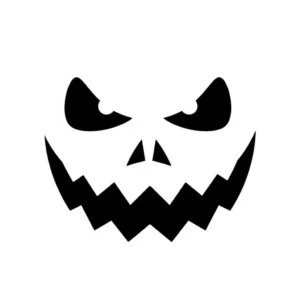
Pumpkin carving stencil exampleAI Prompt: Sinister jack-o-lantern face with a wide mouth and pointy teeth, simple black and white stencil design for pumpkin carving
Coloring pages are always a hit at Halloween party craft stations and make fantastic DIY decorations for classroom celebrations. AI tools like QuillBot’s AI image generator are great for creating custom coloring sheets themed for your specific Halloween event.
This article includes fun ideas for cute, spooky-season motifs, plus tips on personalizing your pages and prompting the AI to generate images kids will love.
Whether you’re creating happy Halloween images for social media posts, party invitations, menus, trunk-or-treat or party decorations, or kids’ craft stations, AI image tools like QuillBot’s free AI image generator can instantly realize your ideas for funny, cute, or spooky visuals.
Begin with a classic Halloween motif and experiment with different visual styles to create your own custom images.
Getting your album cover right is important because it shapes how listeners experience your music. AI album cover generators, such as QuillBot’s free AI album cover generator, can help you realize your creative ideas as part of the album cover design process.